
fomo signals
A signal card

Three types in a row: a call with a thesis, a buy, a sell
- Tag - signal type: FOMO CALL (a call with a thesis), BUY / BUY · NEW (a buy), SELL (a sell).
- Token - ticker, name, market cap, short address and a chain badge (Solana / BNB Chain, a.k.a. BSC / Robinhood Chain).
- Caller - @handle, their total PnL and follower count.
- On the right - the signal’s age and terminal icons to open the token fast.
Subscriptions
fomo signals only come from callers you follow. Open the menu (button on the left of the header) - the SUBSCRIPTIONS block at the bottom, the MY SUBSCRIPTIONS button with the fomo logo: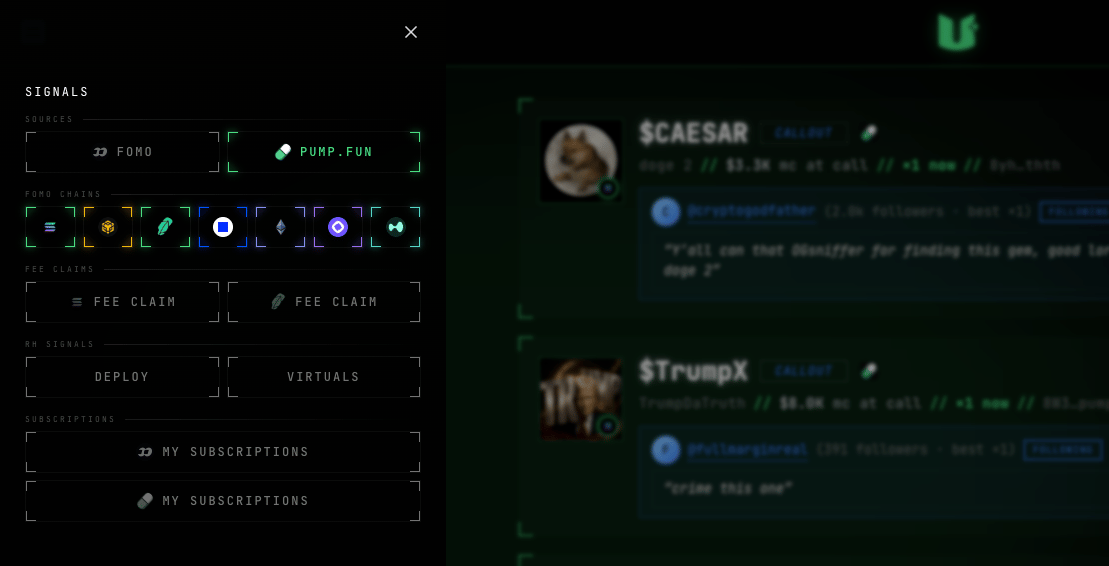
The SIGNALS menu - the MY SUBSCRIPTIONS buttons at the bottom
- suggested - a shortlist of top callers to start fast;
- search by handle;
- follow / unfollow - one click each way.


pump.fun calls
A call card - the CALLOUT tag
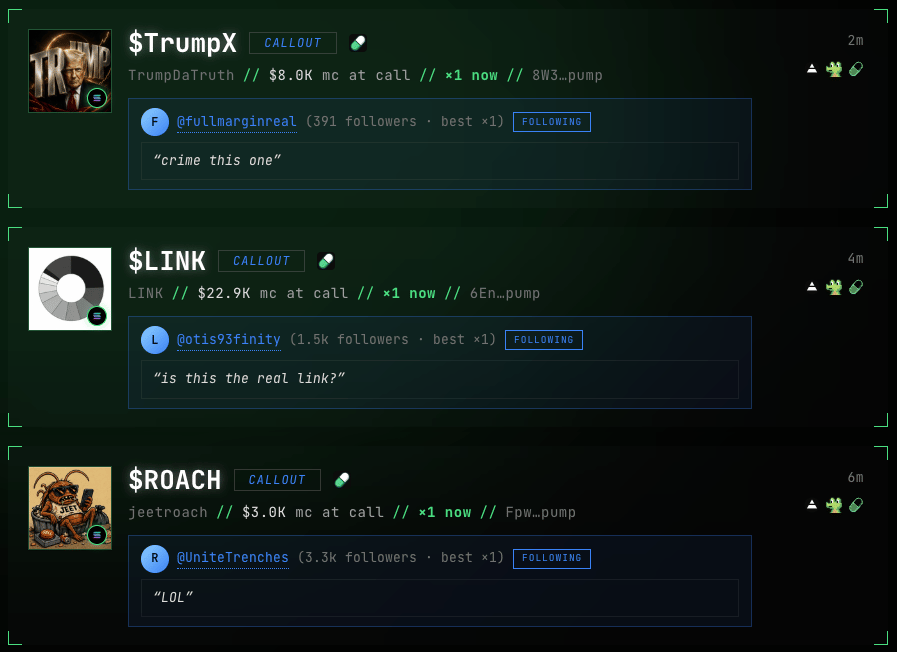
- the caller’s @handle (or a neat short wallet address if they have no handle) and their follower count;
- market cap at call time (
mc at call) and the current multiplier (×… now) - you instantly see whether the token grew after the call; - the caller’s thesis text;
- a follow / unfollow button right on the card;
- if the caller deleted their call, the card stays with a
deletedmark - we keep it.
pump.fun caller subscriptions
pump.fun works the other way around: with no subscriptions you see every caller’s calls. In the same left menu, the second MY SUBSCRIPTIONS button (with the pump.fun logo) opens a search by handle; follow at least one caller - and the feed narrows down to yours only. You can also follow and unfollow right from a call card. Changes apply instantly, no reload.The subscriptions window opens with the MY SUBSCRIPTIONS button with the pump.fun logo

Fee claims
The yellow card with the CLAIM tag (Fee Claim on Robinhood): a known X, Instagram or TikTok account collected its share of a token’s fees - usually an influencer the dev shares fees with. Claims where the token’s own creator collected the fees don’t reach the feed - that’s noise. On the card - the claimer’s avatar and @handle (click opens their profile), follower count, the amount (amount:), a first claim mark if it’s the token’s first claim, and a link to the transaction. Sources: pump.fun, bags.fm, Bankr and Robinhood Chain launchpads.
Clicks
- Short address - copies the contract (CA).
- Terminal icons - open the token in Axiom / GMGN / Terminal (the set depends on the chain).
- The fomo or pump.fun logo - opens the original call on its platform.
- The pump.fun caller’s or claimer’s @handle - opens their profile (fomo caller handles aren’t clickable - the fomo logo opens the original call).
Filters
All filters live in the same left menu (screenshot above, in the subscriptions section):- FOMO - fomo caller signals (calls, buys, sells).
- PUMP.FUN - pump.fun caller calls.
- FOMO CHAINS - which blockchains to show in fomo signals.
- FEE CLAIM - fee claims; there are two tiles - Solana and Robinhood Chain, told apart by the chain logo.
History: a full day of scrolling
The feed keeps 24 hours of history: scroll down - it loads as you go, no wall. On the site the full day of scrolling includes every signal kind, trades included; in the extension window trades (BUY / SELL) don’t scroll deep - they keep a short buffer, otherwise the stream of buys would push everything else out.Next: what the extension does
Notifications, the SIGNALS window, calls on the chart, the dev stats badge on Axiom, X signals and OG Finder - on top of Axiom, GMGN and Terminal.