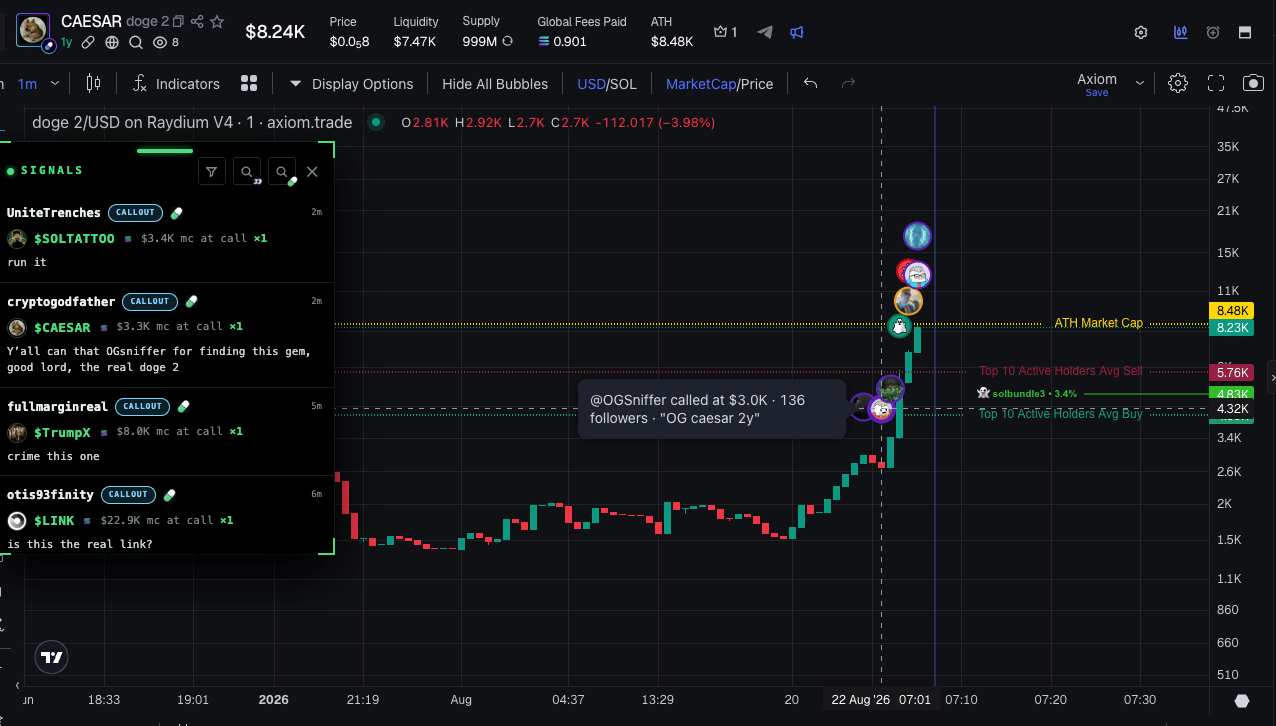
Call circles on the chart with a hover tooltip
What it shows
- A circle with the caller’s avatar sits on the chart at call time. Sources - pump.fun and fomo callers.
- Hover over a circle - a tooltip: the caller’s @handle, follower count, market cap at call time, the peak multiplier after the call and the thesis text.
- Click a circle to open the original call on its platform.
Where it works
Only on Axiom and GMGN charts. No circles on our Terminal or other platforms.Settings
In the extension popup - the CHART MARKS section:- CHART MARKS - the master toggle, turns the circles on and off entirely.
- PUMP.FUN CALLS - pump.fun caller calls.
- FOMO CALLS - fomo caller calls.
- ONLY MY SUBSCRIPTIONS - only show callers you follow.
- FOMO TRADES TOO - also draw fomo callers’ trades (buys and sells) on the chart, not just calls.
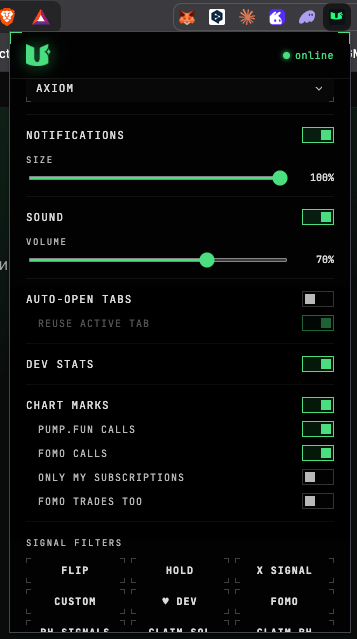
The CHART MARKS section in the extension popup
Next: OG Finder
Find the original token behind any memecoin.